
Aikido Security
With Aikido, development teams get deduplicated, noise-free overview of all their security issues. Aikido shows dev teams which vulnerabilities are exploitable, autofixes many of them, and gives human-readable TLDRs so they can easily fix the rest.
1B
Valuation ;)
60%
Reduction in false positives
5
min or less onboarding
100k+
Teams using Aikido
As the product & design co-founder behind Aikido, I wore many hats – from diving into the nitty-gritty of market research to crafting every pixel on our product screens. Everything at startups is a bit like juggling! I brought the big picture to life by plotting our course, digging into market trends, and making sure our design game was top-notch. Check out the breakdown below to see how this startup whirlwind turned into a unicorn.
From zero to unicorn
How did we begin?
Market research, defining the problem & securing investment
From a research point of view, Aikido’s journey began with a dive into market research, engaging directly with potential customers to understand their needs and aspirations. Through quite a lot of conversations with technical founders, developers and development team leaders we unveiled insights that confirmed our market fit and expanded our knowledge on their challenges. I translated these findings into a set of clear value propositions and product roadmap. We were able to quickly secure investment and reach 3 year revenue targets within 9 months.
Ongoing research & data repository
Something that is important to me in all positions, but even more important at a fast moving startup is that we keep a repository of information, so nothing is lost between team members and we aren’t making gut reaction decisions based on the last call we had, but are able to zoom out while working on necessary features. I built an automated system to import calls, surveys, intercom chats, social comments etc; then to tag those with important topics and we reviewed our insights and learnings each week together to foster a culture of sharing and curiosity vs feature demands and exclusivity.
DESIGN SYSTEM
Building the foundation
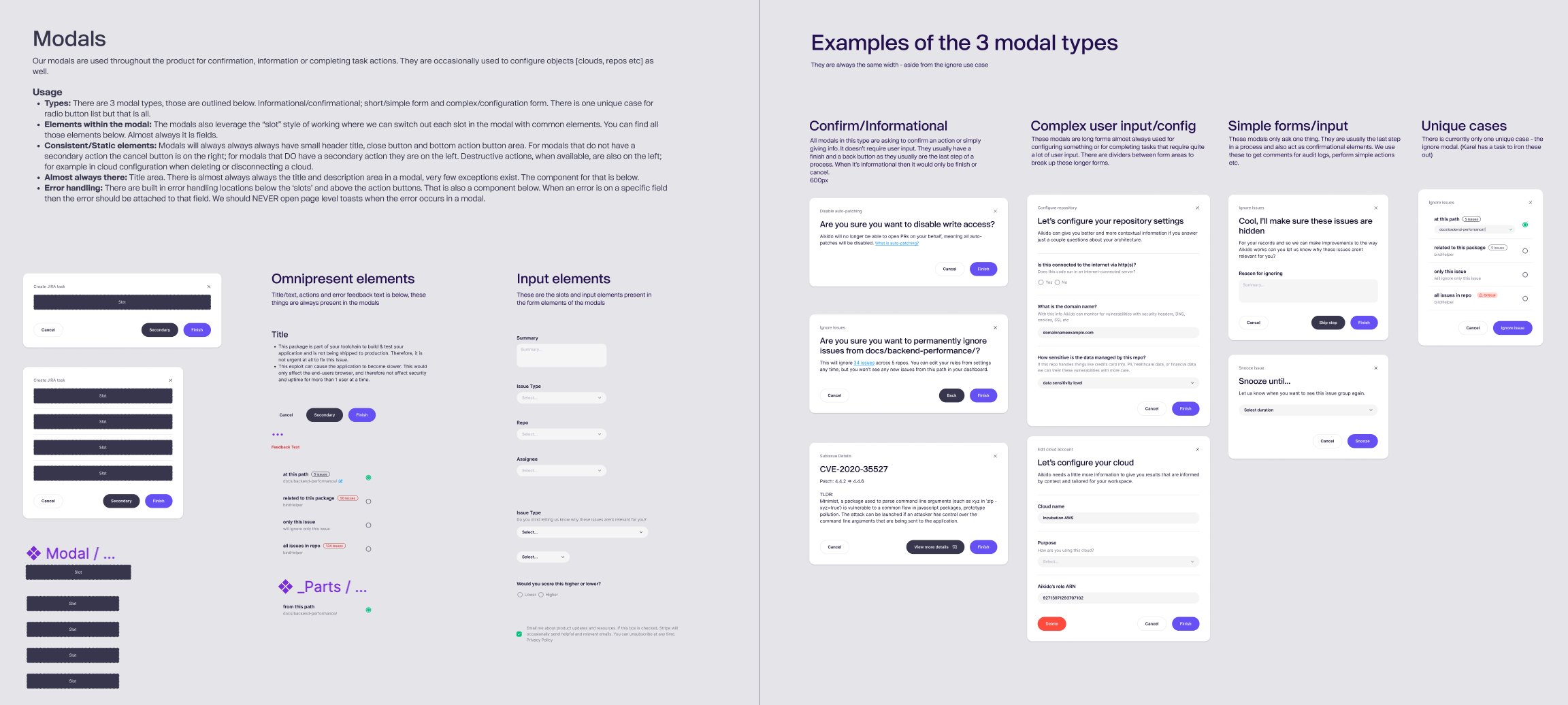
With all startups, it’s important to be able to move quickly, experimenting often and creating a design system that is mirrored in a component system within the code itself is paramount to that. With a design system that is deeply maintainable and comprehensive; there is very little UI guesswork for designers or developers. This reduces the time to completion for a feature dramatically. It also means it was possible to go through a more mature rebrand within a few months of launch with no major dev time lost. This design system was a focus of mine from the start, building it up as we designed necessary features. Everything from modals, tables and our entire screen structure was built with interchangeable and deeply nested blocks. I could talk about it at length, an example of just modals are below. :)
The Features
Some of what we shipped
I designed the entire product top to bottom, each feature coming from user-centered data, balanced with market view and dev resources. All features are built, tested and rolled out in phases. It would be impossible for me to create a case study for each feature or feature set of the product but I’ll include some screens here and if needed I can talk through the entire design file. :)
Non-scary, super-fast, self-serve onboarding
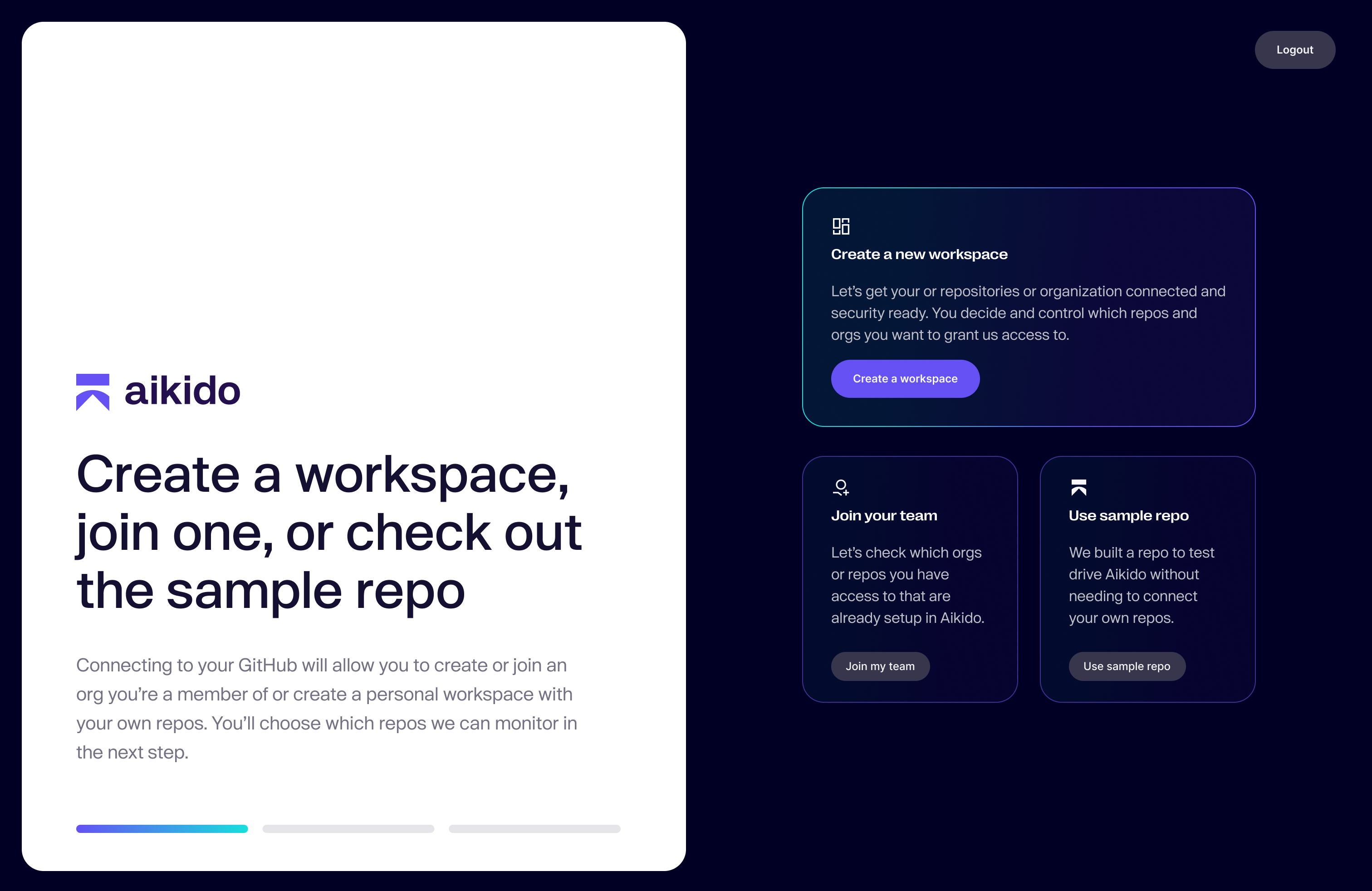
We knew from our market research and experience in devtools that developers don’t want to speak to sales, don’t want to do a demo, don’t want to fill a form. Developers want to test things out on their own, they want to test things quickly and they don’t want to grant access to everything while trying things out. It was critically important for me that we be product-led, allowing teams to grow with Aikido. We also know that developers often work on multiple projects, side projects and teams so allowing developers to switch between those projects easily without signing in and out was critically important. The sign up flow and onboarding had to be airtight for the product to work and we had to nail all of these concepts as one of our first features in order to set up the architecture of the product around these core ideas. What came from that is the sign up flow, each step simplified, self-serve and frictionless, with reassuring text letting users know that we wouldn’t ask for access to everything for them to try it out. We also set up a sample demo repo in case they still needed to be convinced. This demo project was open source so they could try it out with our competitors as well, we needed users to see our confidence. Feel free to go click through the sign up flow at aikido.dev as it has remained almost completely unchanged since the day we deployed it.
The main feed
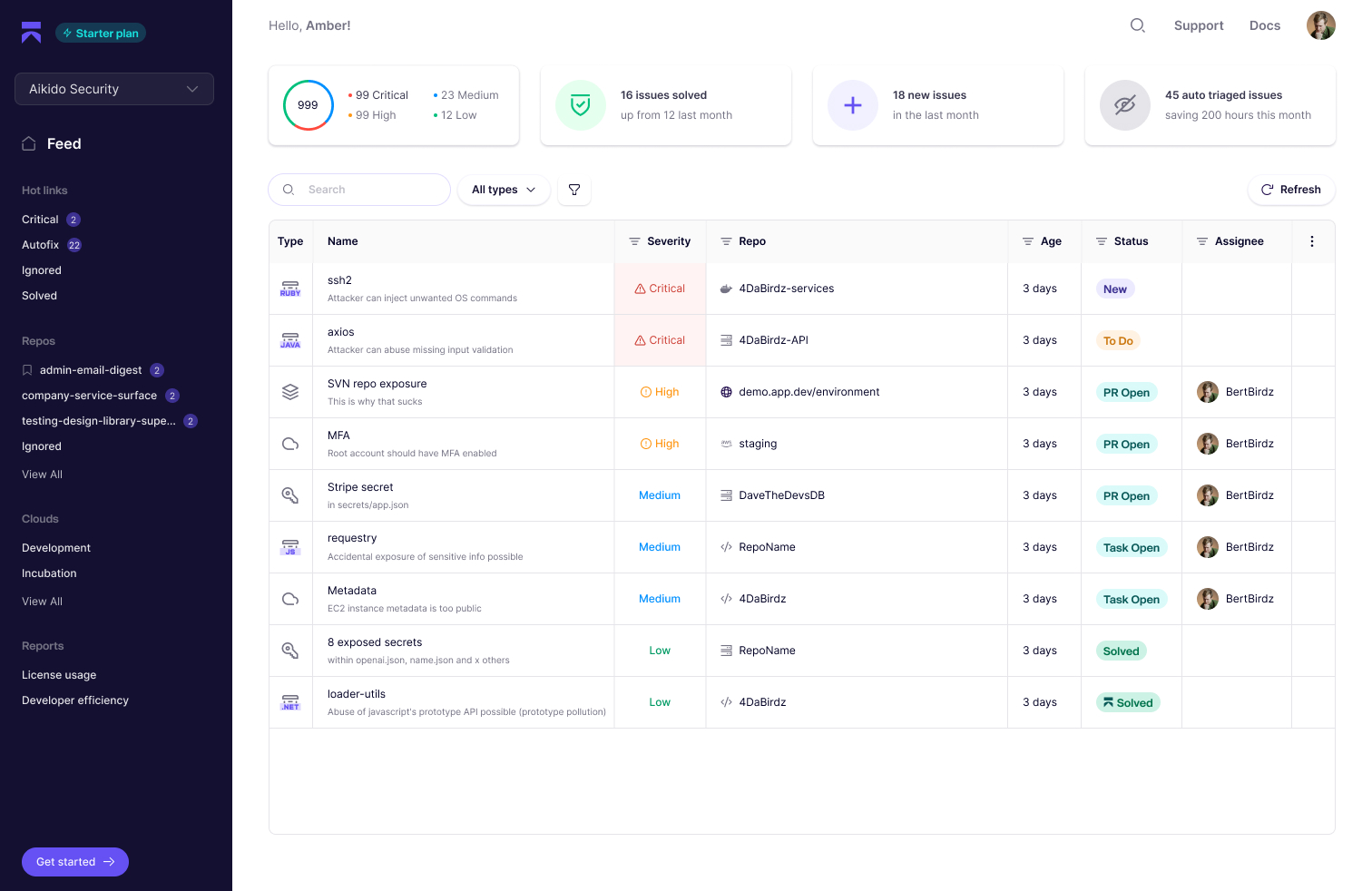
The main feed of Aikido is where the user will conduct most of their work. The primary goal of Aikido, and all devtools, is to be invisible, to solve problems as automated as possible or within their actual workflows, but if a user NEEDS to see something, this is where they will land. It needed to be digestible, prioritized and a place where the primary goal is to get the user to a solution as quickly as possible.
The feed aggregates all security vulnerabilities across environments, deduplicates them, grouping them into how a user would normally solve these issues, it auto ignores issues that are not reachable or do not apply, it will also automatically open PRs for issues that Aikido can easily fix. All of this background work gives the user a simple, intuitive way to work through triage. The purpose of this screen is to enable that triage with speed. Clicking an issue opens a sidebar that gives the overall information about the issue as well as the actions that are important to solving it.
We hope that our users have the majority of their issues autofixed, or surfaced before committing within PR comments, but those that can’t be, we try to make it as fast to solve as possible.
Issue detail
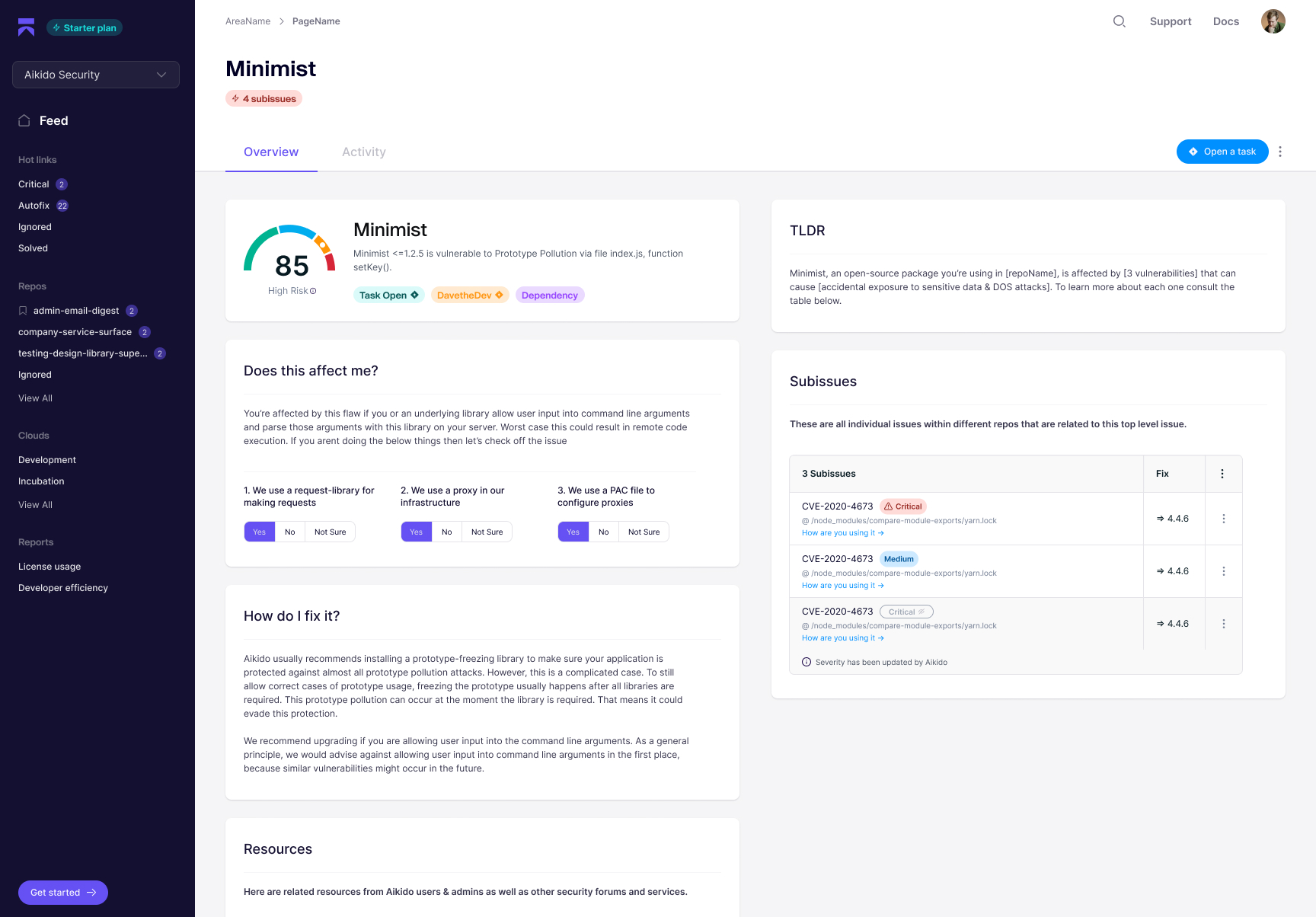
If the user decides the issue needs more effort and cannot be quickly triaged they can open a detail view. These are mainly for the most complex issues. We really wanted to change how complex and intense security vulnerabilities can feel, as a core value prop, so Aikido has human readable TLDRs that help users to understand and solve vulnerabilities, it also has questionnaires that helps Aikido autoignore issues that don’t apply and learn about what it can safely ignore in the future. Simplifying the UX, deduplicating issues and providing human readable summaries was core for us here.
Want to talk?
I’m currently open to consulting, advising and speaking opportunities. I might be open to a full time position with the right team and product fit.
Amber Rucker
LinkedIn↗